| |
| In case you missed it, our new website is live! |
| |
|
The Simio blog is back; other updates include simplified navigation & focused informational content
|
| |
|
| |
|
In case August flew by, and you missed our last edition of Scoop: the new & improved Simio.com is now live!
At long last, we have rolled out a fully re-designed site that includes the return of the Simio blog (with a new post today!) and features a simpler navigation and more focused content, highlighting topics like foundational information on Simio Digital Twin technology, as well as our most popular and evolving product applications.
|
| |
|
| |
|
Demand Driven World is a Month Away
Global DDMRP conference will be held in Frankfurt, Germany October 17-18, 2024
Simio is proud to be a Gold Sponsor for the upcoming Demand Driven World conference, hosted by the global authority on the Demand Driven methodology, the Demand Driven Institute (DDI). The conference, being held October 17-18 in Frankfurt Germany, will feature presentations of nine case studies, five special pre-conference sessions, and 25 breakout sessions.
For more information on Demand Driven World, visit their page: Demand Driven World – The #1 Demand Driven Event in the World.
|
| |
|
| |
|
Will we be seeing you at WinterSim 2024?
Simio is proud to be a Platinum Sponsor for this year’s event – December 15-18, 2024, in Orlando, FL
The Winter Simulation Conference (https://wintersim.org) is the premier annual international conference focusing on discrete event and multi-mode simulation. The conference features academic and commercial presentations. This year’s conference is December 15-18, 2024, and will be held at the Orlando World Center Marriott in Orlando, Florida.
Simio is a Platinum Sponsor for the conference and will hold two user workshops on Sunday, December 15, 2024. If you are interested in learning more about Simio’s participation, contact Jeff Smith (VP, Training & Academic Programs) at jsmith@simio.com.
|
| |
|
| |
|
Simio and Simulation – Modeling, Analysis, Applications, 7th Edition is now available
Updated textbook is now available for download
Authored by Simio co-founder David Sturrock and VP, Training & Academic Programs Jeff Smith, the updated 7th edition of Simio’s official guide to using simulation for better business decisions. Download your copy today!
Download Here
|
| |
|
| |
|
The Fall 2024 Academic Case Study is live!
This semester’s edition highlights simulation at work in aerospace
The much-anticipated Fall 2024 Academic Case Study is now available to download on the new Simio.com. This semester’s Case Study focuses on fictional Simio Aerospace, and case files highlight the necessary process improvements being made to the assembly systems within the manufacturing line. For more information and to download the case files, visit the Academic Case Study page here:
Download Here
|
| |
|
| |
|
Register Now for the Simio Solution Series
Upcoming Webinars
Data Tables: Tips to Best Implement Them in Models and Experiments
Thursday, October 17, 2024, at 11:00AM EDT (3:00 UTC)
In this session, we will look at how data tables can be implemented in your model to drive the creation and behavior of your entities, workers, and machinery. We will look at how to generate objects through data, how to drive entity routes, requirements, and decisions, and how data tables can be used to run experiments and create different possible scenarios.
Register Now
How to Find “The Best” Model Configuration Using Simio’s Optimization and Statistical Analysis Tools
Wednesday, November 13, 2024, at 11:00AM EDT (3:00 UTC)
This session will focus on how to use Simio’s experimentation tools to find “the best” model configuration for a given objective. These tools include Subset Selection function and the OptQuest and Select Best Scenario add-ins. We will discuss the basic concepts of Ranking and Selection and demonstrate the use of these tools with a Simio model.
Register Now
Watch Previous Webinars
|
| |
|
| |
|
Tips & Tricks from the Simio Team
Custom Utilization
|
| |
|
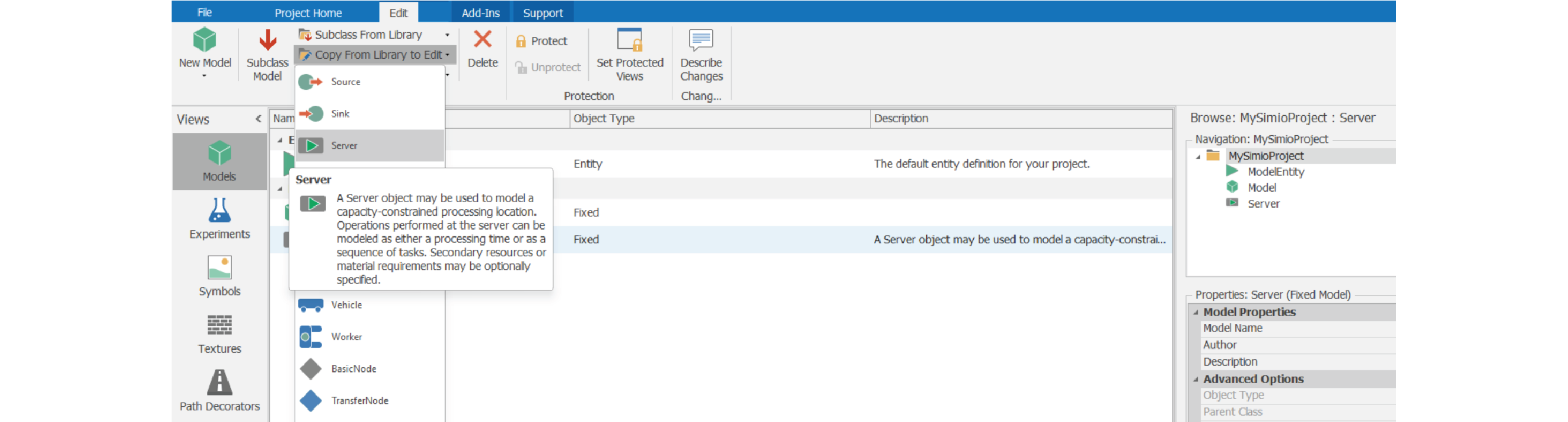
Simio’s Objects come with several ResourceStates applied to them by default. A Server, for instance, has eight different States that it can be in. For certain applications, it may be desirable to create additional states to an Object to provide more granularity to the type of work being performed. To do this, start by selecting “Copying From Library to Edit” and then choose a Server. Rename your custom object to something unique from the default Object name (“MyServer” is the example here).
|
| |
|
| |
|
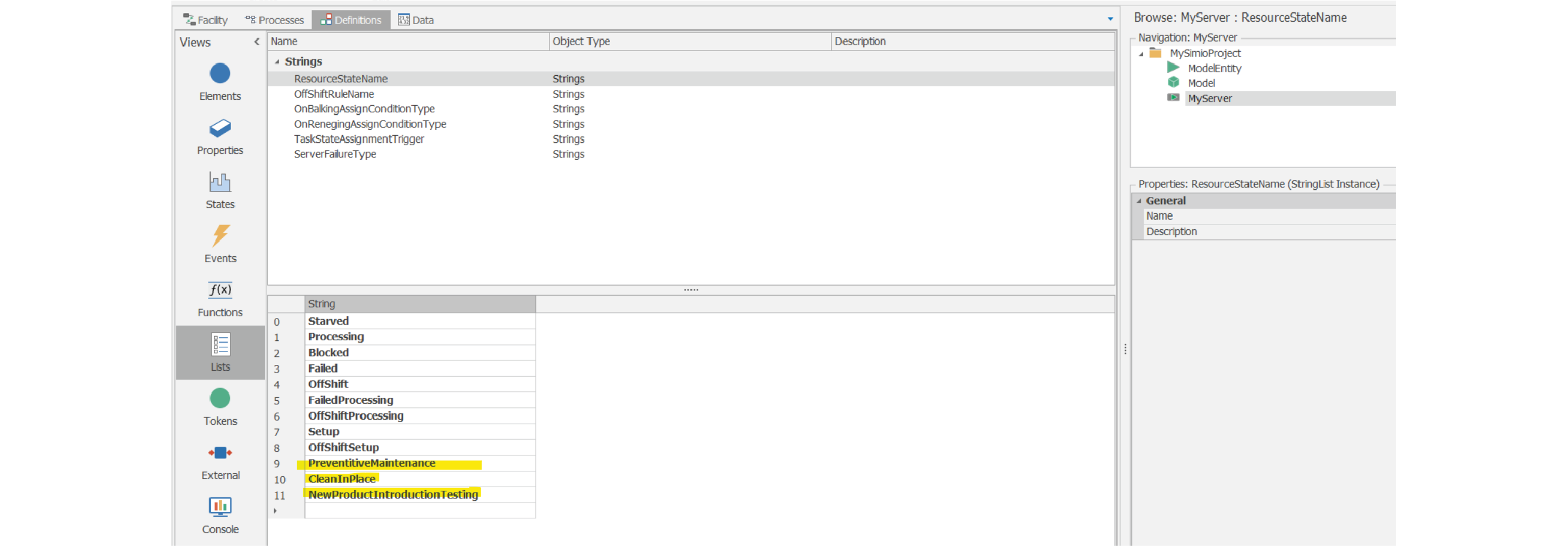
Inside the Object, navigate to the “Lists” tab underneath “Definitions”. Under the specific list “ResourceStateName”, additional ResourceState strings can be added to the List to further define the States the Object can be in.
|
| |
|
| |
|
Under the “States” tab, the newly created states can then be defined as “Utilized” or “NotUtilized”, ultimately affecting the Object’s ScheduledUtilization metric.
|
| |
|
| |
|
From there, the Object’s behavior can be modified and set to a specific ResourceState based on model behaviors.
|
| |
|
| |
|
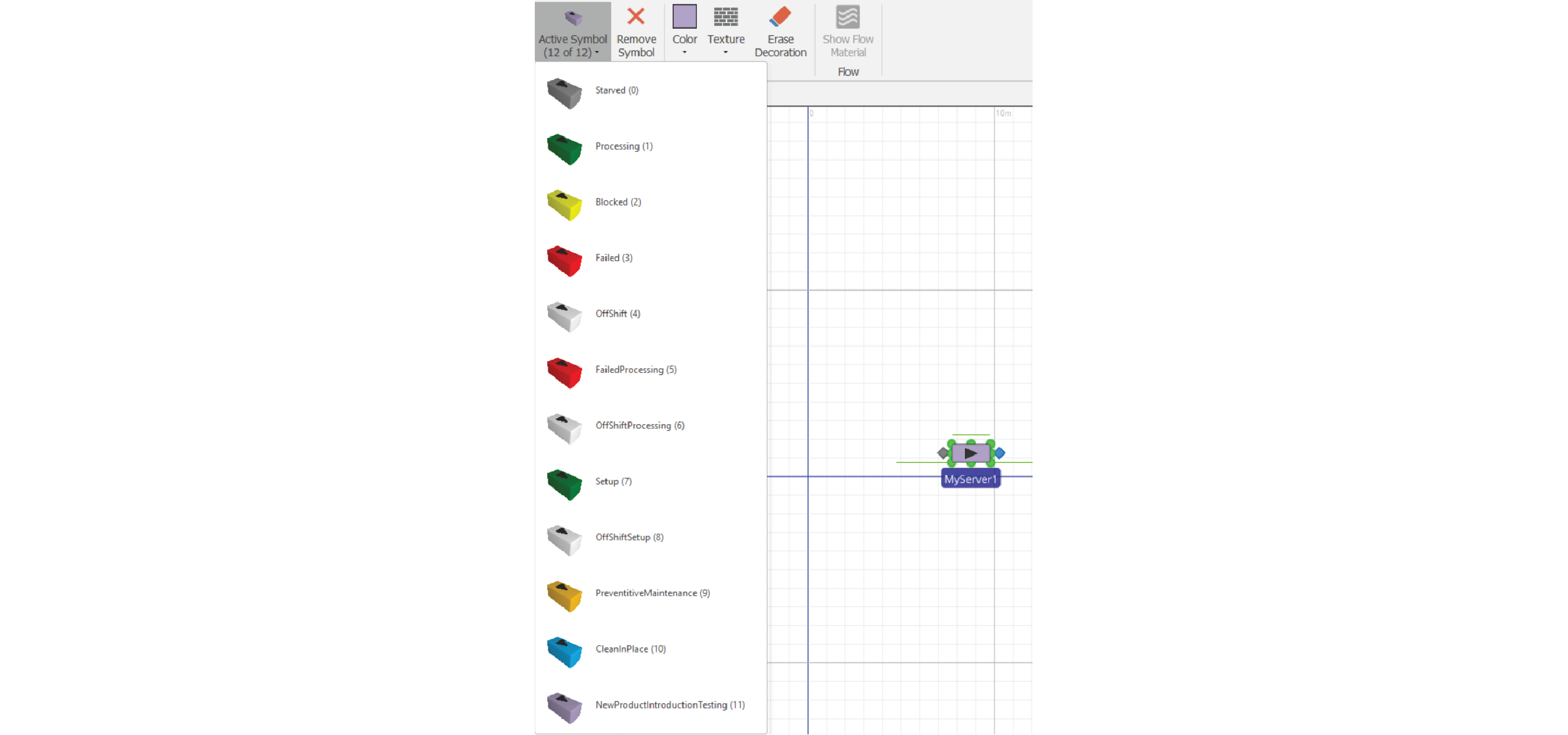
Additional symbols can be added to the Server’s definition.
|
| |
|
| |
|
-Contribution from Drew Rose, Simio Solutions Engineer
|
| |
|
| |
|
Edition 10: September 2024
|
| |
|
|
|