


The evolution of simulation software continues to accelerate as organizations demand more sophisticated tools for operational and strategic decision-making. Simio Release Version 20, encompassing development work from Sprints 281-290, introduces powerful enhancements that address the most pressing challenges facing modern enterprises. From advanced debugging infrastructure to comprehensive data connectivity tools, this release demonstrates how simulation software can drive competitive advantage through enhanced productivity and data-driven insights.
Modern simulation software has become indispensable for organizations navigating complex operational environments. Healthcare facilities coordinate hundreds of interconnected processes, supply chains span multiple continents, airports manage unpredictable demand patterns, and production scheduling demands unprecedented flexibility and precision. The comprehensive Simio Release Notes reveal how each enhancement was designed to address real-world challenges, positioning simulation software as a critical enabler of operational excellence.
The architectural improvements in Simio Release Version 20, including migration to .NET Core v10, ensure long-term platform stability and compatibility with evolving enterprise technology standards. This forward-looking approach protects investments in simulation software while enabling access to future capabilities that support continuous operational improvement.
Enhanced Debugging Infrastructure: Accelerating Development
The enhanced debugging infrastructure introduced across Sprints 281-290 addresses one of the most persistent challenges in simulation software development: identifying and resolving bugs and logic errors efficiently. Sprint 281 introduced Token Count Display, which displays the current number of tokens in a certain process or step in a green box next to the location. This enhancement provides developers with immediate visual feedback on model execution patterns, making it significantly easier to debug complex models and verify that processes are executing as intended.
The enhanced Watch Window functionality provides real-time visibility into queue contents and resource utilization patterns. Sprint 286 significantly expanded the Watch Window to show each token in process, quantities in storage areas, and complete resource ownership details. Sprint 288 added the ability to browse objects within a queue state, particularly useful for warehouse simulations, hospital bed management, or any complex storage scenario.
Sprint 286 also introduced the Collapse/Expand All Process Categories feature, allowing users to right-click to expand or collapse all processes for better organization and easier navigation in models with many processes. Development teams find that these improvements reduce model onboarding time for new team members, enabling faster project scaling and better knowledge transfer.
Advanced Scripting and Data Integration: Powering Enterprise Connectivity
Enterprise organizations require simulation software that integrates seamlessly with existing business systems and data infrastructure. The enhanced scripting and data connectivity features across Sprints 281-290 represent a major advancement in how simulation software connects to enterprise ecosystems.
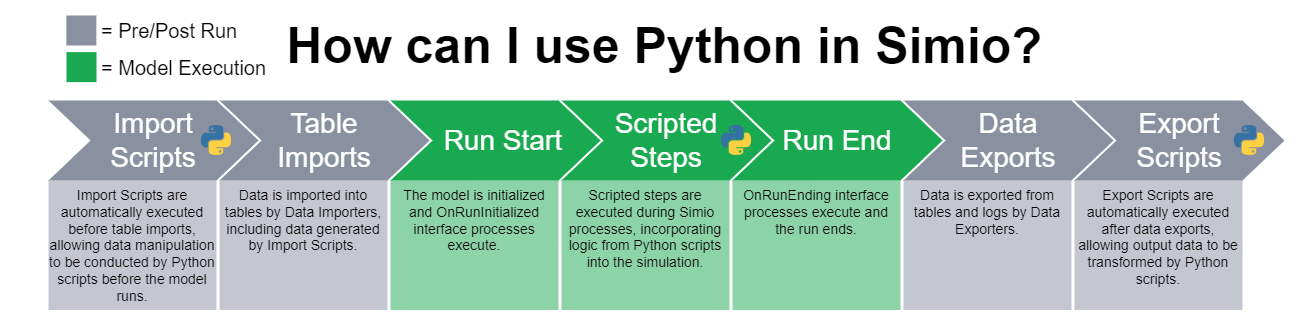
Sprint 282 expanded Python integration capabilities by adding support for additional IDEs, such as Spyder. This flexibility enables development teams to work within their preferred environments, accelerating onboarding and improving productivity. Organizations with data science teams already proficient in Python can now leverage existing expertise when developing simulation models.
Sprint 286 introduced pre-import scripting capabilities, providing an option to run a Python script before a data table imports. Import scripts can stage data and can be used in conjunction with Data Connectors to import data saved to a temporary folder. This capability enables organizations to implement sophisticated data transformation workflows, ensuring that data is properly formatted and validated before simulation runs begin. Sprint 288 added a Run Script Button within the Data Connectors ribbon, allowing users to trigger import script runs without importing data.
Sprint 289 significantly expanded these capabilities with automated export script execution. Export scripts can be used to transform data exported from Simio for use in other applications. Financial planning teams can automatically generate budget forecasts based on simulation outputs, while operations managers can update schedules directly from simulation results.
Triggers for export scripts can be set for various timing toggles, including manual exporting, after plan runs or risk analysis runs, and project save. This flexibility allows organizations to implement event-driven data workflows that respond automatically to business events and simulation milestones.
Sprint 290 completed the documentation for these powerful features by adding comprehensive Simio Help topics for the import and export scripts and Python environment. A new SimBit project called “Using Import and Export Scripts” includes two models providing examples of using an Import Script and using an Export Script. Additionally, the SimioU Learning Byte “Transform Your Data With Import Scripts” provides step-by-step guidance for implementing these capabilities in your own models.
Enhanced Output Window: Transparency in Operations
Sprint 287 introduced an entirely new Output Window that provides visual feedback to users for data imports and exports. This addresses a critical need for transparency in data operations, helping users understand exactly what’s happening during simulation runs. Sprint 289 expanded the Output Window capabilities to provide visual feedback for data exports, including exported data sources, export script runs and errors. Additionally, Python information such that log data normally found in the SimioActions log is now also found in the Python output window.
For organizations running simulations multiple times per day, the Output Window provides essential visibility into whether data exports completed successfully and whether downstream systems received updated information. When export scripts fail or encounter errors, development teams can immediately identify and resolve issues.
Dashboard and Visualization Excellence
Modern organizations require sophisticated visualization capabilities to extract actionable insights from simulation results and operational data. The dashboard enhancements across Sprints 281-290 transform how decision-makers interact with simulation software outputs, providing intuitive interfaces that make complex data accessible to stakeholders across all organizational levels.
Sprint 287 introduced interactive Gantt visualization capabilities within dashboards. Enhanced Gantt chart components (powered by DevExpress) have been added to dashboards to allow users to visualize the interactive or planning Gantt by entity, resource, or constraint. Organizations find that these enhanced visualization tools improve the quality of scheduling decisions. The ability to visualize resource conflicts and optimization opportunities directly within dashboards eliminates the need for separate analysis tools and streamlines the decision-making process.
Sprint 289 enhanced dashboard capabilities with target data visibility that provides real-time comparison between planned and actual performance metrics. For any given data table, the Target Detail, Value, and Status information is now visible to be used within dashboards. Organizations can identify potential issues before they impact schedules or customer commitments.
Sprint 289 also added support for relative Excel file paths in dashboards. When using Excel files as the data source for dashboards, they can now be specified using a relative location rather than an absolute location, improving collaboration when models are transferred between team members or systems.
Data Table and Schema Flexibility
Sprint 289 introduced significant flexibility enhancements for data tables. The ability to change Data Table State Column types provides flexibility similar to changing a Data Table Property Column type. Organizations find that these improvements reduce data-related model errors while simplifying the process of maintaining data consistency across multiple simulation projects.
Sprint 289 also enhanced state property assignments across object levels. Within any process step or object that displays drop-downs for state property assignments, the list now includes states within multiple levels of an object definition. This is especially helpful for user custom objects as well as Flow and Extras library objects.
The Object Reference State Enhancement in Sprint 289 allows you to define what type of object is referenced in a state variable. When defining an object reference state, you can now define what type of object is referenced in this state, minimizing levels of type casting and making code more readable.
Sprint 284 introduced the Data Table Initial Property Reference Enhancement, which updates Initial Property Values when references change when renaming table columns, ensuring data integrity is maintained even as model structures evolve.
Production Scheduling and Operational Excellence
Simio Release Version 20 introduces specific enhancements that address the unique challenges of complex operational environments. Sprint 290 introduced the enhanced Remove step functionality with number tracking capabilities. The Remove step now has a Save Number Removed property that allows for an optional state variable entry to save the total number of items removed from the collection. This capability is valuable for understanding exact consumption rates, whether tracking materials in manufacturing, patients discharged from healthcare units, or parcels shipped from distribution centers.
Sprint 285 introduced Data Driven Queues, allowing you to define an object’s queues in a data table. This capability enables operations teams to define queue behaviors and priorities directly from data tables, enabling dynamic adjustments based on changing business priorities and operational requirements without modifying simulation logic.
Sprint 282 enhanced the ReserveBins and ReserveStock steps with new properties including Save Phase Number and Save Starting Storage Area Reference. These enhancements provide better control over resource reservation and allocation processes across multi-stage operations.
Sprint 281 introduced the Bill Of Materials SimBit project, which includes four models providing examples of using Bill of Materials and Bill of Materials Group Elements.
Workflow and Process Optimization
Sprint 288 made the Run Ribbon available from the Data tab, allowing users to control simulation execution while monitoring data tables without constantly switching between views. Sprint 287 enhanced node configuration capabilities with the Node’s Appearance Link Graphic feature, streamlining the process of building large-scale network models from data.
Sprint 281 introduced several usability enhancements including a new Delay Type property option of ‘UntilTime’, which delays a token to a specific end datetime value. Sprint 281 also introduced the Floating-Point Comparison Mode, a new advanced option model property that allows you to set a model tolerance that Simio will use for evaluating normal expressions. This is complemented by the Math.AlmostEqual expression, which compares two specified values and indicates whether they are almost equal using a combination of relative and absolute tolerances.
Portal and Collaboration Features
Sprint 290 introduced Linux container support, representing a significant advancement in deployment flexibility. Organizations can now integrate Simio Portal with existing cloud infrastructure and DevOps workflows. Simio Portal requires an external Microsoft SQL Server instance (2019 or later recommended), and the container does not bundle a database.
Sprint 285 enhanced Portal experimentation capabilities with three key improvements. The Experiment Upload Enhancement adds all scenarios defined in Simio Desktop automatically to an experiment when uploaded to Simio Portal. The Experiment Scenario Enhancement allows you to quickly delete all scenarios in an experiment at once. The Replication Count Enhancement displays the replication count information on the Run Metrics page.
Sprint 282 introduced Portal improvements including Compute Node Performance Visualization, which shows how a run in the queue of Portal is performing relative to the computational power of your Portal. The Ability to Sort Experiment Result Columns allows you to sort the controls and responses of a completed experiment.
Strategic Business Impact Through Architectural Improvements
Sprint 286 introduced the most significant architectural change with the upgrade to .NET Core v10. Simio is now on .NET Core v10, which is the LTS version supported out until November 2028. This forward-looking approach protects organizational investments in simulation software while enabling access to future capabilities.
As part of this upgrade, Microsoft deprecated its previous SqlClient libraries and Simio moved to the latest version. The latest version of Microsoft.Data.SqlClient requires organizations to update their connection strings to include the following two properties for security reasons: “Encrypt=True;TrustServerCertificate=True;” Organizations must update these settings accordingly in importer and exporter configurations.
Sprint 283 focused on closing several bugs and making refactors to improve application performance, ensuring the platform maintains stability and responsiveness as new features are added.
Sprint 281 introduced significant 3D Rendering Enhancements, enabling users to import external SkyBoxes and Physically Based Rendering texture materials into Simio, enhancing the visual quality and realism of simulation models.
Experience Advanced Simulation Software
The features introduced in Simio Release Version 20 across Sprints 281-290 constitute a strategic advancement that enables organizations to achieve better business outcomes through more effective simulation and optimization capabilities. From enhanced debugging infrastructure to comprehensive data connectivity enhancements, from advanced visualization capabilities to sophisticated operational planning tools, these enhancements deliver measurable value while establishing a foundation for continued operational excellence.
Discover how Simio Release Version 20 can transform your approach to operational modeling and strategic planning. Experience the full capabilities of our advanced simulation software with a free 30-day trial. Download your free trial today and see firsthand how Simio delivers the flexibility, power, and innovation required for modern business success.